
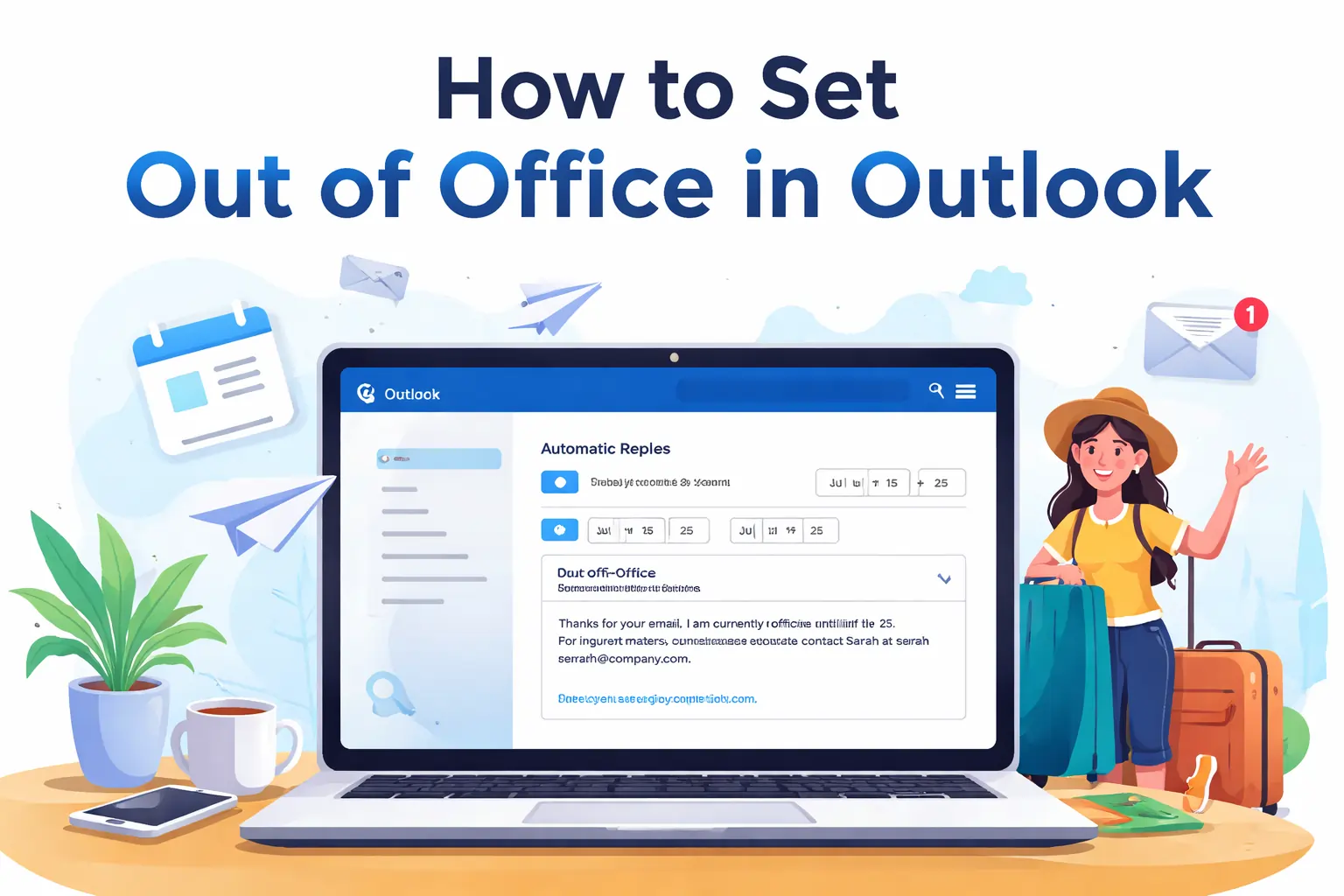
How to Set Out of Office in Outlook
Have you ever left your desk for a vacation or a busy work trip and worried about all the emails piling up? While you are away you do not want to leave colleagues clients, or teammates guessing about your availability. Setting an out of office message in Microsoft Outlook is the simplest solution. It informs everyone that you are currently unavailable and helps manage expectations.
This guide will cover everything you need to know to set out of office in Outlook. Whether you are using desktop web app mobile Teams shared mailbox, or even your calendar, you will find step by step instructions and tips to craft professional messages. You will also get examples of messages for internal and external recipients and troubleshooting tips.
What is Out of Office in Outlook
An out of office message is an automatic reply sent to anyone who emails you while you are away. This feature allows you to maintain professionalism even when you are not at your desk. It helps avoid inbox overload and sets clear expectations for when people can expect your response.
Out of office messages are commonly used in scenarios like vacation sick leave maternity or paternity leave, business trips, conferences, company holidays, jury duty, and bereavement leave. Using automatic replies ensures that urgent matters are directed to the right contacts while you take your time away from work.
How to Set Out of Office in Outlook Desktop
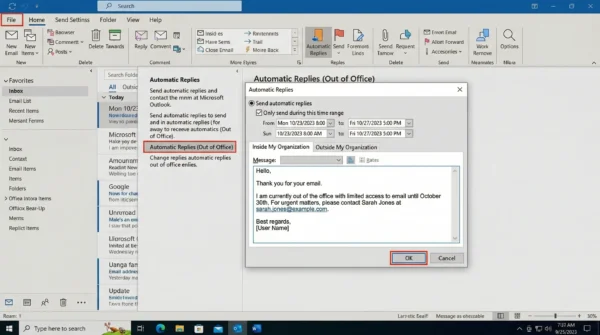
If you are using the desktop version of Outlook start by opening the application. Then click File and select Automatic Replies or Out of Office If you do not see this option check under Info.
Turn on Send automatic replies and set the start and end times. Start time should be when your absence begins and end time is when you plan to return. Setting a date range automatically disables the reply after the end time.
Compose your message in a clear and friendly manner. State your return date mention if you have limited email access, and provide alternate contact information if necessary. You can also set a separate message for external recipients by checking Send replies outside my organization. Once done click OK to save your settings.
Example message can be: Thanks for your email. I am currently out of the office until end date. For urgent matters contact colleague name at colleague email. Best regards your name.
How to Set Out of Office in Outlook Web
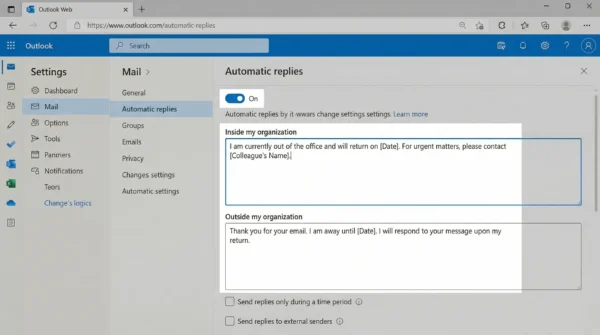
Outlook web users can also set automatic replies by clicking the gear icon for Settings, then select View all Outlook settings Go to Mail Automatic Replies, and turn on automatic replies. Set start and end times. Compose your message for internal and external recipients and click Save.
Always test your automatic reply by sending an email from a different account to confirm that the message is delivered correctly.
How to Set Out of Office in Outlook App
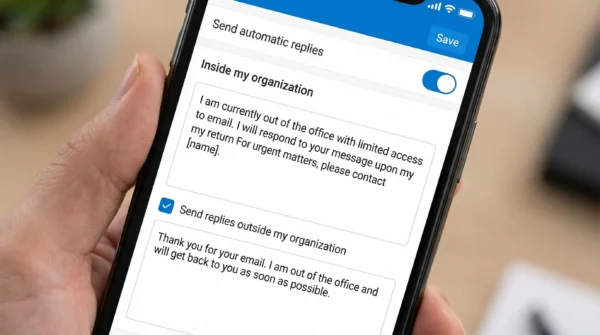
For mobile users open the Outlook app and go to Settings. Select your Mail account and tap Automatic Replies. Turn on Send replies and choose whether to reply to everyone or organization only. Set start and end times and compose your message. Save the changes to activate automatic replies.
How to Set Out of Office in Outlook 365 and Shared Mailboxes
If you are using Outlook 365 shared mailboxes require a slightly different approach. Open Outlook desktop or web and open the shared mailbox in account settings. Follow the steps for Automatic Replies. Compose your message set start and end times, and save. Some organizations may require admin permission to set out of office for shared mailboxes.
It is important to coordinate with your IT team if you are managing shared mailboxes so that automatic replies function correctly.
How to Set Out of Office in Outlook Calendar
You can also mark your calendar as Out of Office to show colleagues your availability. Open Calendar create a new event, and select Show as Out of Office. Set the date and time. Add optional notes and save This method does not send automatic replies but visually informs your team. Combine it with automatic replies for complete coverage.
How to Set Out of Office in Outlook and Teams
If your organization uses Teams you can sync your status with Outlook. Automatic replies in Outlook can automatically change your Teams status to Out of Office. This ensures colleagues know your availability even if they try to reach you on Teams chats. Turn on the sync option when setting automatic replies in Outlook, and your Teams status will update.
How to Set Out of Office Without Auto Reply
Sometimes you may not want to send automatic replies but still want to mark yourself unavailable. Use Calendar to create Out of Office events. Set your status as Busy or Out of Office. You can also add notes explaining your absence. This allows people to see your availability without receiving automatic emails.
Tips for Writing a Professional Out of Office Message
Be clear and concise. State the dates you will be away mention if you have limited email access, and provide alternate contact information. Add a friendly personal touch if appropriate. Keep sensitive information private and do not overshare. Use short paragraphs for readability. You can also use bullet points or bold key information for emphasis.
Standard message can be: I am out of office until date. Limited access to email. For urgent matters contact colleague name.
Humorous message can be Out exploring the mountains until date. Responses may be delayed. Contact colleague name for urgent matters.
Informative message can be I am attending event from start date to end date. For account inquiries contact contact. For demo requests contact contact For technical support visit link. For general questions I will respond upon return date.
Troubleshooting Out of Office Issues
If automatic replies are not sending check the dates toggle and save settings. If replies are not being received verify spam filters and external message settings. If automatic reply does not stop manually disable it if no end date is set. For shared mailboxes make sure you have proper permissions.
FAQ’s
1. How do I set out of office in Outlook for shared mailbox?
Open the shared mailbox follow automatic replies steps, and set your message. Admin permission may be required.
2. Can I set different messages for internal and external recipients?
Yes check send replies outside my organization box and craft your external message.
3. How to set out of office in Teams and Outlook together?
Turn on automatic replies in Outlook and sync with Teams. Your Teams status changes automatically.
4. Can I set out of office without sending auto replies?
Yes, mark your calendar as Out of Office or Busy People will see your status but not receive automatic emails.
5. My out of office message is not working what should I do?
Verify dates, message toggle save settings, and test by sending yourself an email.
Conclusion
Setting up an out of office message in Outlook is simple but important for professional communication Whether on desktop web mobile Teams shared mailbox or calendar following these steps ensures no emails are missed and colleagues know when to expect a response Take a few minutes to set up your message before your next vacation business trip or leave Clear professional messages save time manage expectations and allow you to enjoy your time away without stress
